
👥 Staff Management for Daycares
Manage staff records, roles, status, and permissions in one place. View total, active, and inactive staff at a glance. Search, edit, and assign roles with ease.
Staff Dashboard Overview
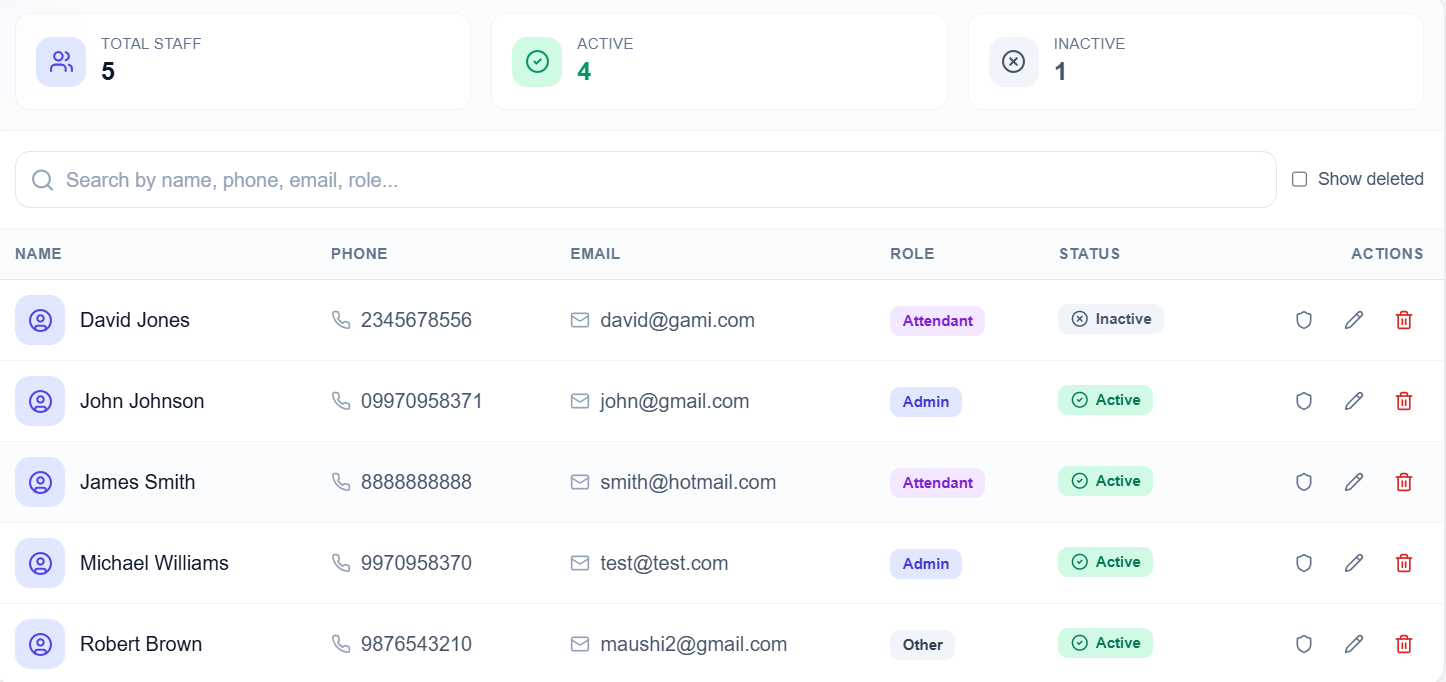
The Staff Management dashboard gives you a centralized view of your entire workforce. At the top, summary cards show Total Staff, Active, and Inactive counts so you can monitor workforce status at a glance. Below, a search bar lets you filter by name, phone, email, or role. A "Show deleted" checkbox lets you view soft-deleted records for auditing or recovery.
Total Staff
5
Active
4
Inactive
1
Staff Member Table — What You See
The main staff listing shows each team member in a clear, organized table:
- NAME — Full name with profile icon for quick recognition
- PHONE — Contact number for calls and WhatsApp follow-ups
- EMAIL — Email address for formal communication
- ROLE — Color-coded badges: Admin (blue), Attendant (purple), Other (gray) for role-based access and job designation
- STATUS — Active (green with checkmark) or Inactive (gray with cross) for employment status at a glance
- ACTIONS — Shield (permissions), Pencil (edit profile), Trash (delete/archive) for full CRUD and permission control
Key Features
Smart Search
Search by name, phone, email, or role. Find any staff member instantly without scrolling through lists.
Roles & Status
Assign roles like Admin, Attendant, or Other. Track status as Active or Inactive with clear visual badges.
Staff List
View all staff with name, phone, email, role, and status in one organized table.
Permissions
Manage permissions and access levels for each staff member with one click.
Quick Edit
Edit staff details, update roles, or change status with one click. Streamlined workflow for busy admins.
Soft Delete & Archive
Soft-delete staff when they leave. Use "Show deleted" to view archived records for auditing, compliance, or recovery.
Staff Management Capabilities
- Centralized staff database — One place for all caregiver information
- At-a-glance overview — Total, active, inactive counts for workforce monitoring
- Granular search and filtering — Find staff by name, phone, email, or role
- Role-based access control — Admin, Attendant, Other with different permissions
- Status tracking — Active/inactive for operational planning
- Full CRUD operations — Create, read, update, delete staff records
- Permission management — Shield icon for access control per staff member
- Data integrity — Soft-delete retains history for auditing
Why Daycares Need Staff Management
- Centralized staff database: All caregiver info in one place — name, phone, email, role, status
- Clear role assignment: Admin, Attendant, Other — know who does what at a glance
- Active/inactive tracking: Plan staffing, track who is currently working
- Fast search: Find any staff member in seconds by name, phone, email, or role
- Employee contact management: Quick access for calls, WhatsApp, or email
- Daycare HR management: Replace spreadsheets with a proper staff information system
- Permission control: Manage who can access what — shield icon for role-based permissions
- Staff roster software: Build and maintain your daycare staff directory effortlessly
Integrated with Other SchoolSkout Features
FAQs
What is daycare staff management?
Staff management for daycares is a system to store and manage caregiver records — name, phone, email, role, and status. You can assign roles (Admin, Attendant, etc.), track active vs inactive staff, and manage permissions.
How does staff management help daycares?
It keeps all staff information in one place. You can search quickly, see who is active, assign roles, and manage permissions. No more scattered spreadsheets or paper records.
Can I assign different roles to staff?
Yes. SchoolSkout lets you assign roles like Admin, Attendant, or Other. Each role can have different permissions. You can also mark staff as Active or Inactive.
Can I search staff by name or phone?
Yes. The Staff Management dashboard has a search bar. You can search by name, phone, email, or role. Find any staff member instantly.
What does the "Show deleted" checkbox do?
Staff records use soft delete — when you remove someone, they are archived, not permanently erased. Check "Show deleted" to view archived staff for auditing, compliance, or to restore a record if needed.
How do I manage staff permissions?
Use the shield icon in the Actions column for each staff member. You can set role-based permissions so Admins have full access while Attendants have limited access — keeping your daycare data secure.
Streamline Staff Management — One Place for All Records
Join daycares across India using SchoolSkout to manage staff professionally. Try free for 30 days — no credit card required.
Explore: Staff & Attendance | Kids Management | Daycare Software